728x90
session 기본값 확인 하기
프로젝트 우클릭 - Java Build Path - Libraries - Apache Tomcat 위치 확인

web.xml : session-config 확인

session-timeout " 30분 " 기본 값

session timeout 직접 설정하기 ( 우선순위 : controller > web.xml )
1. web-xml = 모든 세션에 타임아웃 설정
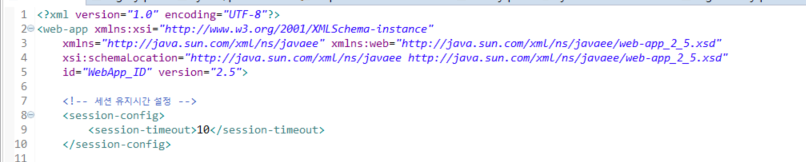
<!-- 세션 유지시간 설정  -->
<session-config>
	<session-timeout>10</session-timeout> // 분 단위 - 10분
</session-config>
2. controller = 특정 세션만 타임아웃 설정
session.setMaxInactiveInterval(20*60); // 초 단위 - 20분* 그외의 session 시간 및 제거 *
getCreationTime() - 세션 생성 시간
getLastAccessedTime() - 마지막 요청 시간
setMaxInactiveInterval() - 최대허용시간 설정 (초)
getMaxInactiveInterval() - 최대허용시간
invalidate() - 세션 제거
'Basic' 카테고리의 다른 글
| Apache Log4j 보안이슈 : Log4j-core 2.17.0 다운로드 (0) | 2021.12.20 |
|---|---|
| [JAVA]Java 변수 type 확인 / getClass().getSimpleName() (0) | 2021.07.30 |
| .xls 시트가 나오지 않을경우 해결방법 (0) | 2021.07.20 |
| [Zoom] 줌 시간제한 없이 무제한 이용하기 (nate.com) (2) | 2021.05.07 |
| [html] <a target ( _blank, _self, _parent, _top ) > (0) | 2021.04.16 |