728x90
[Spring] WebSocket sockJS Q&A 실시간 알림 구현하기 (1)
WebSocket : 웹소켓에서는 서버와 브라우저 사이에 양방향 소통이 가능 웹 소켓은 HTML5 이후에 나왔기 때문에 Socket.io와 SockJS 이용해서 HTML5 이전 기술로 구현된 서비스에서도 웹 소켓처럼 사용할 수
truecode-95.tistory.com
[ 개발 부분 ]
WebSocketHandler.java
package egovframework...;

import java.util.Map;
import java.util.concurrent.ConcurrentHashMap;

import org.apache.commons.lang3.StringUtils;
import org.apache.ibatis.session.SqlSession;
import org.slf4j.Logger;
import org.slf4j.LoggerFactory;
import org.springframework.beans.factory.annotation.Autowired;
import org.springframework.stereotype.Repository;
import org.springframework.web.socket.CloseStatus;
import org.springframework.web.socket.TextMessage;
import org.springframework.web.socket.WebSocketSession;
import org.springframework.web.socket.handler.TextWebSocketHandler;

import egovframework.pcr.main.web.controller.AdminController;

@Repository
public class WebSocketHandler extends TextWebSocketHandler {

   @Autowired
   SqlSession sqlsession;
   private static final Logger logger = LoggerFactory.getLogger(AdminController.class);

   private Map<String, WebSocketSession> users = new ConcurrentHashMap<>();

   @Override
   public void afterConnectionEstablished(WebSocketSession session) throws Exception{
      logger.debug(session.getId() + " 연결 됨");
      users.put(session.getId(), session);
   }

   @Override
   protected void handleTextMessage(WebSocketSession session, TextMessage message) throws Exception {
      String msg = message.getPayload();
  	  // js에서 보낸 세션 아이디 값
      if(StringUtils.isNotEmpty(msg)) {
         String sendId = msg;
         // 현재 session에 담겨있는 모든 사용자를 체크하기 위함.
         for (WebSocketSession responseIdSession : users.values()) {
            if (responseIdSession != null) {
               TextMessage tmpMsg = new TextMessage(sendId);
               responseIdSession.sendMessage(tmpMsg);
            }
         }
      }
   }

   @Override
   public void afterConnectionClosed(WebSocketSession session, CloseStatus status) throws Exception{
      logger.debug(session.getId() + " 연결 종료됨");
      users.remove(session.getId());
   }
}
js
<script>
   var socket = null;
   connect();

   function connect() {

      // egov-com-sevlet.xml에서 mapping path에 걸려 웹소켓 핸들러가 요청을 처리
      var ws = new WebSocket('ws://${pageContext.request.serverName}:${pageContext.request.serverPort}${pageContext.request.contextPath}/websocket.do');
      socket = ws;

      // 연결 성공시
      ws.onopen = function() {
         console.log('Info: connection opened.');
      };

      // 응답 메세지 수진 부분
      ws.onmessage = function(event) {

         var gUserId = $("#userSessionId").val();
         var sm = event.data;

         // 로그인한 사용자에겐 알림이 가지않도록 하기 위함.
         if(sm != gUserId){
            var websocketQna =  document.getElementById("websocketQna");
            websocketQna.style.display = "block";

            // setTimeout을 주어 3초만 화면에 출력
            setTimeout(function(){
               websocketQna.style.display = "none";
            }, 3000); //3000 : 3초
         }
      };
      // 연결 종료시
      ws.onclose = function(event) {
         console.log('Info: connection closed');
      };
      // 에러 발생시
      ws.onerror = function(err) {
         console.log('Error:', err);
      };
   }

   // 제일 먼저 실행 되는 부분.
   $(document).ready(function() {
      // 버튼을 클릭 시 이벤트
      $('#alertQnaOk').on('click', function(evt) {

         // 현재 로그인 한 sessionId를 가져오기 위함.
         var gUserId = $("#userSessionId").val();

         // form 안에 있는 input 등 전송할 수 있는 동작을 중단
         evt.preventDefault();

         // readyState 1일때 webSocket객체 이벤트를 발생시킨다.
         if (socket.readyState !== 1)
            return;

         // 세션값을 보낸다.
         socket.send(gUserId);
         $('#alertQna').css('display', 'none');
      });
      socket.onclose();
   });
</script>
html
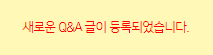
 <div class="alret QnA" id="websocketQna" style="top:-10px;left: 1345px;">
    <h4>새로운 Q&A가 등록되었습니다.</h4>
    <div class="btn-box">
    </div>
 </div>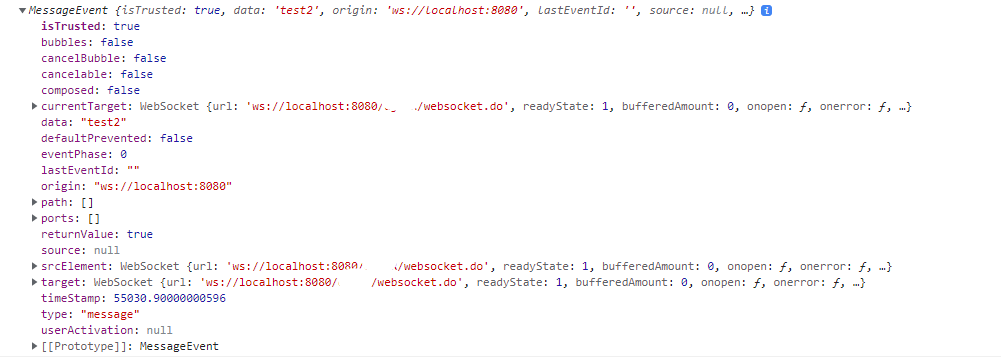
추천 글이 insert 될때 websocket을 백단에서 호출해 실시간 알림을 구현은 아래 클릭
[Spring] WebSocket sockJS Q&A 실시간 알림 구현하기 (3)
[ 개발 부분 ]
truecode-95.tistory.com
'Spring' 카테고리의 다른 글
| 컨트롤러 아닌곳에서 session 값 얻기 (0) | 2021.11.28 |
|---|---|
| [JAVA] sever ip 얻는 방법 InetAddress.getLocalHost() (0) | 2021.11.28 |
| [Spring] WebSocket sockJS Q&A 실시간 알림 구현하기 (1) (0) | 2021.11.11 |
| [Spring] javax.servlet.ServletException: No adapter for handler 해결방법 (0) | 2021.11.10 |
| [JAVA] java.lang.Integer cannot be cast to java.lang.String 형변환 오류 해결하기 (0) | 2021.10.29 |